CMPSC 64: Computer Organization and Architecture
CMPSC 64: Computer Organization and Architecture
Von Neumann Architecture
The 5 main components of a computer:
- Processor (CPU)
- Memory (RAM)
- Input Devices (Keyboard)
- Output Devices (Display Screen)
- Secondary Data Storage (SSD)
Memory is composed of data address and data value. Each memory address stores a data value.
Binary Number System
Base 10 (decimal): digits 0-9.
Base 2 (binary): digits 0 and 1.
Base 8 (octal): digits 0-7.
Base 16 (hexadecimal): digits 0-9 and letters A-F.
Positional Notation: each digit represents a power of the base, depending on its position. .
Least Significant Bit (LSB): rightmost bit in a binary number.
Most Significant Bit (MSB): leftmost bit in a binary number.
Hexadecimal and binary table:
| Hex | Binary | Hex | Binary |
|---|---|---|---|
| 0x0 | 0000 | 0x8 | 1000 |
| 0x1 | 0001 | 0x9 | 1001 |
| 0x2 | 0010 | 0xA | 1010 |
| 0x3 | 0011 | 0xB | 1011 |
| 0x4 | 0100 | 0xC | 1100 |
| 0x5 | 0101 | 0xD | 1101 |
| 0x6 | 0110 | 0xE | 1110 |
| 0x7 | 0111 | 0xF | 1111 |
Group 3 binary digits to convert to octal.
Group 4 binary digits to convert to hexadecimal.
Data Unit
1 byte (B) = 8 bits (b)
1 word = 4 bytes
- kb = bits
- Mb = bits
- Gb = bits
- kB = bytes
- MB = bytes
- GB = bytes
- KiB = bytes
- MiB = bytes
- GiB = bytes
Two's Complement (二进制补码)
Positive to negative, negative to positive:
- Invert all bits (0s to 1s and 1s to 0s).
- Add 1 to the inverted binary number.
It's a reversible algorithm: applying it twice returns the original number.
The MSB indicates the sign of the number.
In positive binary numbers, MSB is , and trailing 0s do not affect the value. (00101 = 101 = 5)
In negative binary numbers, MSB is , and trailing 1s do not affect the value. (11101 = 1101 = -3)
Given an n-bit binary number:
- Unsigned range: to .
- Signed range: to .
CPU must use a fixed number of bits to represent numbers.
Out of range results in overflow. carry out bit (C): indicates unsigned overflow. overflow bit (V): indicates signed overflow.
Overflow conditions for addition:
- Adding two positive numbers yields a negative result.
- Adding two negative numbers yields a positive result.
Binary logical operations:
- NOT:
- AND:
- OR:
- XOR:
- NAND:
- NOR:
Bitwise operations:
- NOT:
~(tilde);~(1001) = 0110 - AND:
&(ampersand);(1010 & 1100) = 1000- 1 & b = b
- 0 & b = 0
- OR:
|(pipe);(1010 | 1100) = 1110- 1 | b = 1
- 0 | b = b
- XOR:
^(caret);(1010 ^ 1100) = 0110- 1 ^ b =
- 0 ^ b = b
- Left Shift:
<<; shifts bits to the left, filling with 0s on the right.(0011 << 2) = 1100 - Right Shift:
>>; shifts bits to the right. For unsigned numbers, fills with 0s on the left.(1100 >> 2) = 0011For signed numbers, fills with sign bit (arithmetic shift).(1100 >> 2) = 1111
Machine
- Arithmetic operations
- Logic operations
- Assignment operations
- Branching operations
- Data memory access operations
CPU Fetch-Execute Cycle:
- Fetch instruction from memory (using Program Counter, PC).
- Decode instruction (using Instruction Register, IR).
- Execute instruction (using Arithmetic Logic Unit, ALU).
- (Optional) Store result back to memory or register.
Components of CPU:
- Arithmetic Logic Unit (ALU)
- CPU memory
- Register bank
Simplified CPU Memory Map:
- Reserved for OS
- User Variables
- User Programs
- Reserved for I/O
core components of CPU
- Program Counter (PC)
- Instruction Memory
- Instruction Register (IR)
- Register Block
- Arithmetic Logic Unit (ALU)
- Data Memory
- Control Unit
Assembly Language
Machine language consists of binary instructions that the CPU can execute directly.
Assembly language is a low-level programming language that uses mnemonic codes to represent machine-level instructions. Each Assembly instruction corresponds directly to a machine code instruction.
Architecture: MIPS
The architecture of MIPS CPU is RISC (Reduced Instruction Set Computer), which uses a small set of simple instructions for efficiency.
Restrictions of MIPS:
- Can only assign integers directly to registers.
- Can only perform arithmetic operations between registers, always two numbers.
Components of MIPS program:
- Comments: start with
#and extend to the end of the line. - Instructions: consist of an operation (opcode) and operands (registers, immediate values, labels).
- Labels: used to mark locations in code for branching and jumping.
Segments of MIPS Program
.datasegment: for declaring initialized data or constants..textsegment: for the actual code (instructions) of the program.
Registers
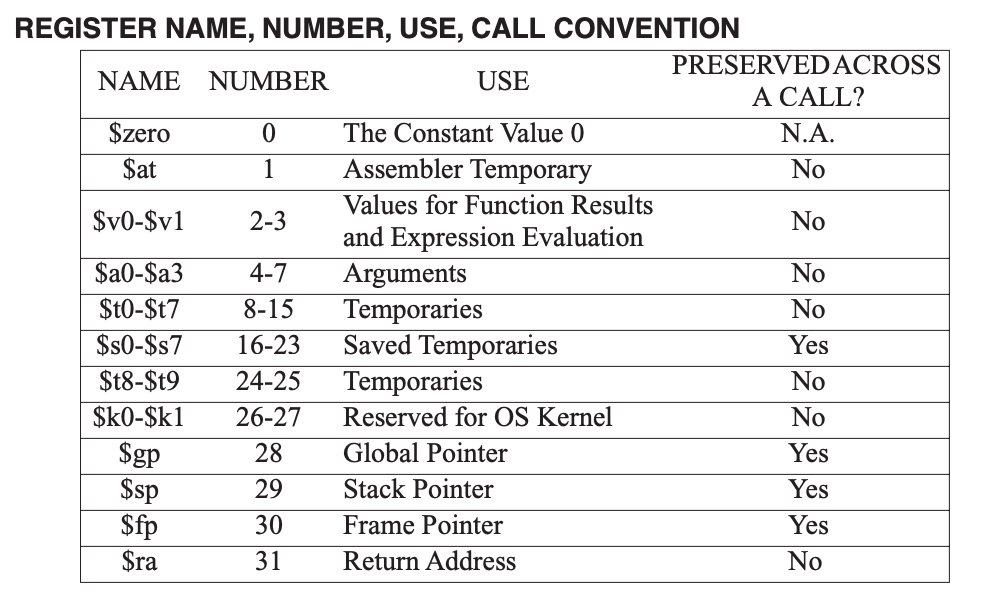
Registers in MIPS (32 total):
$zero: always contains 0 and cannot be overwritten
$t0-$t9: temporary registers (not preserved across function calls)
$v0-$v1: function return values. Syscall code in$v0for system calls1: print integer (argument in$a0)4: print string (argument in$a0)5: read integer (result in$v0)10: exit program
$a0-$a3: function arguments
$s0-$s7: saved registers (preserved across function calls)
$k0-$k1: reserved for OS kernel
$gp: global pointer
$sp: stack pointer
$fp: frame pointer
$ra: return address for function calls$at: reserved for assembler
Core Instructions
register-types, immediate-types, jump-types, arithmetic-logical-instructions, memory-access-instructions, branching-instructions, pseudo-instructions
R-type Instructions
Syntax: <op> <rd>, <rs>, <rt>
(<operation> <destination_register>, <source_register_1>, <source_register_2>)
add $t0, $t1, $t2      # $t0 = $t1 + $t2
addu $t0, $t1, $t2     # $t0 = $t1 + $t2 (unsigned, ignores overflow)
sub $t0, $t1, $t2      # $t0 = $t1 - $t2
and $t0, $t1, $t2      # $t0 = $t1 & $t2
or  $t0, $t1, $t2      # $t0 = $t1 | $t2
xor $t0, $t1, $t2      # $t0 = $t1 ^ $t2
nor $t0, $t1, $t2      # $t0 = ~($t1 | $t2)
nor $t0, $t1, $zero    # $t0 = ~($t1 | 0) = ~$t1

sll $t0, $t1, 2       # $t0 = $t1 << 2 (shift left logical)
srl $t0, $t1, 2       # $t0 = $t1 >> 2 (shift right logical)
I-type Instructions
Syntax: <op> <rt>, <rs>, <immediate>
(<operation>(6) <target_register>(5), <source_register>(5), <immediate_value>(16)), so immediate is a 16-bit signed integer.
addi $t0, $t1, 10      # $t0 = $t1 + 10
andi $t0, $t1, 0x0F      # $t0 = $t1 & 0x0F
lw <rt>, <offset>(<rs>)
lw $t0, 3($t1)       # Load word from memory address ($t1 + 3) to $t0
sw $t0, 3($t1)       # Store word from $t0 to memory address ($t1 + 3)
Branching Instructions:
beq $t0, $t1, label   # Branch to "label" if $t0 == $t1
bne $t0, $t1, label   # Branch to "label" if $t0 != $t1
J-type Instructions
Syntax: <op> <address>
(<operation>(6) <target_address>(26))
j label     # Jump to "label"
jal label   # Jump and link to "label" (store return address in $ra)
Pseudo-instructions
move $t0, $t1          # Move value from $t1 to $t0
li $t0, 100            # Load immediate: $t0 = 100
la $t0, label         # Load address of "label" into $t0

blt $t0, $t1, label   # Branch to "label" if $t0 < $t1
bgt $t0, $t1, label   # Branch to "label" if $t0 > $t1
ble $t0, $t1, label   # Branch to "label" if $t0 <= $t1
bge $t0, $t1, label   # Branch to "label" if $t0 >= $t1
set-less-than instruction:
slt $t0, $t1, $t2 # $t0 = ($t1 < $t2) ? 1 : 0
Examples
Print the integer value that's in register $t0:
li $v0, 1       # syscall code for print integer
move $a0, $t0   # move value from $t0 to $a0 (argument for syscall)
syscall
Read an integer from user input and store it in register $t0:
li $v0, 5       # syscall code for read integer
syscall
move $t0, $v0   # move the read integer from $v0 to $t0
Exit the program:
li $v0, 10  # syscall code for exit
syscall
Multiplication and Division
mult $t1, $t2          # Multiply $t1 by $t2
mflo $t0               # Move the lower 32 bits of the product from LO to $t0
mfhi $t0               # Move the upper 32 bits of the product from HI to $t0

mul $d, $s, $t       # $d = $s * $t
div $s, $t            # Divide $s by $t
mflo $d               # Move the quotient from LO to $d
mfhi $d               # Move the remainder from HI to $d
(product result P, multiplicand M, multiplier N)
Multiplication Algorithm:
- Initialize to 0.
- While :
- If
M & 1(LSB) is 1,P += N. N << 1(multiply by 2).M >> 1(divide by 2).
- If
- Return .
Direct proof:
If , then , where is the i-th bit of M.
Iterative proof:
- If is even,
- If is odd,
- Repeat until
Note
Direct arithmetic operations on integers are always done in the ALU.
ALU ignores the overflow error for addu.
Memory Access
.data segment is used for declaring variables and constants.
.text segment is used for the actual code (instructions) of the program.
1 word = 4 bytes = 32 bits
There's addresses, each pointing to 1 byte of data.
Word Alignment: word addresses must be multiples of 4 (0, 4, 8, 12, ...).
Example:
.data

num: .word 5           # an integer 5 (32-bit word)
arr: .word 1, 2, 3     # [1, 2, 3] array of words
buf: .space 16         # reserve 16 bytes of uninitialized space (garbage values)

var2: .byte 0xFF        # byte variable initialized to 255
str1: .asciiz "Hello, World!"  # null-terminated string
newline: .asciiz "\n"   # null-terminated string for newline
Memory Allocation Map
from where to where in MIPS
- Reserved:
0x00000000to0x00000FFF - Text Segment:
0x00400000to0x0FFFFFFF - Data Segment:
0x10000000to0x10007FFF - Stack Segment:
0x10000000to0x7FFFFFFC - Reserved:
0x80000000to0xFFFFFFFF
Big Endian vs Little Endian:
- Big Endian: stores the MSB first. (in use)
- Little Endian: stores the LSB first.
Todo: memory allocation map
table of instruction formats with each field:
| Instruction Type | Opcode (6 bits) | rs (5 bits) | rt (5 bits) | rd (5 bits) | shamt (5 bits) | funct (6 bits) |
|---|---|---|---|---|---|---|
| R-type | opcode | rs | rt | rd | shamt | funct |
| I-type | opcode | rt | rs | immediate | (16 bits) | |
| J-type | opcode | address (26 bits) |
Instruction Representation
Each instruction is represented as a 32-bit binary number.
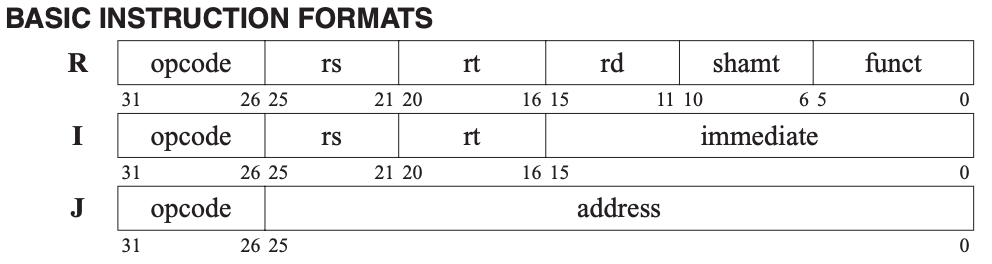
R-type Instruction Format
- Opcode (6 bits): operation code (always
000000for R-type) - rs (5 bits): source register 1
- rt (5 bits): source register 2
- rd (5 bits): destination register
- shamt (5 bits): shift amount
- funct (6 bits): function code (specifies the exact operation)
I-type Instruction Format
- Opcode (6 bits): operation code
- rs (5 bits): source register
- rt (5 bits): target register
- immediate (16 bits): immediate value or address offset (signed: -2^15 to 2^15-1)
Functions
jal: jump and link. It jumps to the target address and stores the return address (the address of the next instruction) in the $ra register.
jr: jump register. It jumps to the address contained in the specified register (usually $ra for returning from a function).
func:
    # Function body
    jr $ra  # Return to caller
main:
    jal func  # Call the function "func"
exit:
Arguments are passed in registers $a0 to $a3.
Return values are passed back in registers $v0 and $v1.
If there are more than 4 arguments, the additional arguments are passed on the stack.
Top of the stack is at lower address, while bottom of the stack is at higher address.
The stack pointer ($sp) points to the top of the stack. Equals 0x7FFFFFFC initially. Has a stack limit of 0x10000000 (256 MB).
Preserved means that the caller expects the value to remain unchanged after the function call.
Unpreserved means that the caller does not expect the value to remain unchanged after the function call.
Calling convention:
- Caller saves preserved registers on stack before the call.
- Caller passes arguments in
$a0-$a3and additional arguments on the stack. - Caller executes
jalto call the function. - Callee performs the function's operations, using unpreserved registers for any temporary values.
- Callee returns the result in
$v0and$v1, and executesjr $rato return to the caller. - Caller restores preserved registers from stack after the call if needed.
Stack operation:
- To push a value onto the stack:
addiu $sp, $sp, -4  # Move stack pointer down by 4 bytes
sw $s0, 0($sp)     # Store value from $s0 onto stack
- To pop a value from the stack:
lw $s0, 0($sp)     # Load value from stack into $s0
addiu $sp, $sp, 4   # Move stack pointer up by 4 bytes
Digital Logic Circuits

Operation Signs:
- NOT:
- AND:
- OR:
- XOR:
- NAND:
- NOR:
Combinatorial Logic.
Boolean Algebra Laws:
- Idempotent:
- Identity:
- Null / Domination:
- Inverse / Complement:
- Commutative:
- Associative:
- Distributive:
- De Morgan's:
- Absorption:
- Consensus:
- Redundancy:
- Double Negation:
- XOR:
Karnaugh Map
Rules:
- Group 1s in rectangles of 2^n cells.
- The rectangles must be as large as possible.
- The rectangles must be as few as possible.
- The rectangles must cover all 1s.
- The rectangles may overlap.
- The rectangles must not contain any 0s.
- The rectangles must not contain any 1s that are already covered by another rectangle.
- The leftmost and rightmost columns are adjacent, as are the top and bottom rows.
Note the order of the variables: 00, 01, 11, 10.
"Don't care" (X) means that the value does not matter.
Digital Logic Circuits
Multiplexer (MUX)
A multiplexer is a combinational logic circuit that selects one of several inputs and forwards it to a single output.
General Mux Descriptor: -bit, MUX.
N:1 MUX: (If is 1, is selected)
2:1 MUX: (If is 0, is selected, if is 1, is selected)
bool mux(bool i0, bool i1, bool s0) {
    return (!s0 && i0) || (s0 && i1);
}
Mux Configurations: A, B -> O where A, B, O are all 32-bit values. Only 1 selector bit is needed.
1-bit Adder
A full adder is a digital circuit that adds two bits and carries.
bool fullAdder(bool a, bool b, bool cin) {
    bool sum = a ^ b ^ cin;
    bool carry = (a && b) || (b && cin) || (a && cin);
    return sum, carry;
}
In symbolic form:
1-bit ALU
1-bit ALU: , , , .
Opcodes and ALU Operations
| Opcode () | ALU Operation |
|---|---|
| 000000 | A & B |
| 000001 | A | B |
| 000010 | A + B |
| 000011 | A - B |
Sequential Logic Circuits
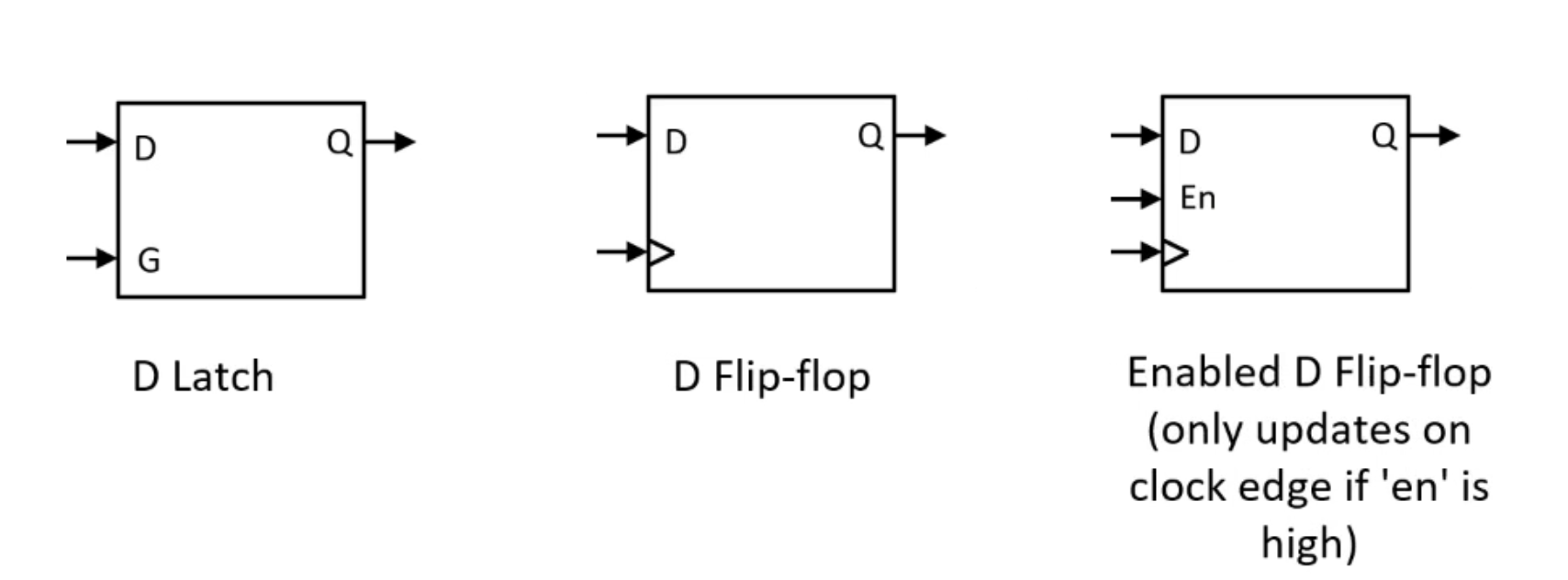
Unlike combinational circuits (outputs depend only on current inputs), sequential circuits have memory: their outputs depend on the current inputs and on the history of past inputs. They use feedback and storage elements (latches or flip-flops).
SR Latch (Set-Reset Latch)
A latch is a level-sensitive memory element (no clock). The SR latch has two inputs: Set and Reset. It has two outputs: and (complement); normally . Often built from two cross-coupled NOR gates (active-high S, R) or two cross-coupled NAND gates (active-low , ).
| S (Set) | R (Reset) | Q |
|---|---|---|
| 1 | 0 | 1 (set) |
| 0 | 1 | 0 (reset) |
| 0 | 0 | Q (hold) |
| 1 | 1 | X (invalid — avoid; forces both outputs to 0; releasing to 0,0 leaves next state undefined) |
Gated D-Latch
A D-latch has data input and enable . It is level-sensitive: when , the latch is transparent (output follows ); when , it holds the last value.
when ; holds when .
| D | E (Enable) | Q |
|---|---|---|
| D | 1 | D |
| D | 0 | Q (hold) |
Clock and Edge Terminology
A clock is a periodic digital signal (e.g. 0→1→0→1…). Period is the time for one cycle (seconds); frequency (Hz).
- Rising (positive) edge: transition from 0 to 1.
- Falling (negative) edge: transition from 1 to 0.
Clocked D-Latch
When the enable is driven by the clock, the latch is transparent while the clock is active (e.g. high) and holds when the clock is inactive. So the stored value can change any time during the active phase (level-sensitive).
D Flip-Flop
A flip-flop is edge-triggered, not level-sensitive. A D flip-flop (e.g. positive-edge-triggered) samples input only at the rising edge of the clock and holds that value until the next rising edge. The output is stable between edges, which avoids glitches that can occur with transparent latches.
- Positive-edge-triggered: captures on the rising edge (0→1).
- Negative-edge-triggered: captures on the falling edge (1→0).
Many D flip-flops are built from two D-latches in series (master–slave): the first (master) is transparent when CLK is low, the second (slave) when CLK is high, so the overall behavior is edge-triggered at the rising edge.
Setup time : must be stable for this time before the active clock edge.
Hold time : must be stable for this time after the active clock edge.
Violating setup or hold can cause metastability (undefined output).
Optional inputs: asynchronous reset (Clear) or preset (Set) force to 0 or 1 regardless of CLK; used for power-on or manual reset.
Register: a group of D flip-flops sharing the same clock (and often the same reset), storing an -bit value.
Summary: Latch = level-sensitive (transparent when enabled). Flip-flop = edge-triggered (captures at one clock edge).
Finite State Machines (FSMs)
A state is a distinct configuration of the system (e.g. represented by the outputs of flip-flops). A finite state machine is a model of a system that is in exactly one of a finite number of states at any time and changes state in response to inputs.
Formally, an FSM has:
- A finite set of states
- A finite set of inputs
- A transition function (current state + input → next state)
- A finite set of outputs and an output function (see Moore vs Mealy below)
- An initial (start) state — the state when the system starts or after reset
State diagram: circles (or nodes) = states; directed edges = transitions, labeled with input (and output for Mealy). Example: an edge from A to B labeled “1/0” means on input 1, go to B and output 0 (Mealy).
Mealy Machine
In a Mealy machine, the output depends on the current state and the current input. So the output is associated with each transition.
Example state transition table (Mealy):
| Current State | Input | Next State | Output |
|---|---|---|---|
| A | 0 | B | 0 |
| A | 1 | A | 1 |
| B | 0 | A | 0 |
| B | 1 | B | 1 |
Moore Machine
In a Moore machine, the output depends only on the current state, not on the input. So each state has a single output value.
Example: state A has output 1, state B has output 0. Transition table (output column = output of current state):
| Current State | Input | Next State | Output |
|---|---|---|---|
| A | 0 | B | 1 |
| A | 1 | A | 1 |
| B | 0 | A | 0 |
| B | 1 | B | 0 |
Moore outputs are stable for the entire time the machine is in a state; Mealy outputs can change as soon as the input changes (within the same state).
Trade-offs: Mealy machines often need fewer states for the same behavior (output can depend on input). Moore machines have no output glitches from input changes during a state; Mealy outputs can have short glitches when inputs change. Both are equivalent in expressive power (any Mealy machine can be converted to Moore by expanding states, and vice versa).